

Launching products or campaigns globally shouldn’t mean drowning in endless spreadsheets, broken file versions, and manual back-and-forth. As software, marketing, and design stacks become more connected, manual translation processes simply can’t keep up.
A Translation Management System (TMS) transforms localization from a slow, fragmented task into a continuous, automated pipeline. It connects your entire tech stack (from GitHub and Figma to your CMS) and allows teams to release localized content instantly without losing quality or brand consistency.
In this guide, we will cover how a modern TMS works, why companies of all sizes need one, and how to choose the right system for your workflows.
Content Overview
- What is a Translation Management System? It’s a cloud-based platform that automates and manages your entire localization workflow.
- Why invest in a TMS? It saves time and money, improves teamwork, speeds up delivery, and ensures brand consistency.
- What features does a Crowdin TMS have? Key features include Translation Memory, Glossary, Machine Translation (MT), AI features, In-Context Editors, Workflow Automation, and integrations with your content tools.
- How do you choose the best translation management system? Look for scalability, ease of use, strong integration capabilities, reliable support, robust security, and a flexible pricing model.
- Is Translation Management System only for large companies? No, TMS solutions are available and highly beneficial for businesses of all sizes, from startups to large enterprises.
What is a translation management system?
A Translation Management System (TMS) is a cloud-based platform that automates and streamlines every stage of the localization workflow. It connects source content, translation assets (like Translation Memory and Glossaries), linguistic teams, and automated integrations into a single workspace.
Instead of manually exporting files, tracking versions over email, or hoping different translation teams use consistent terminology, a TMS handles the background work. It automatically routes content to the right people or AI models, keeps your global terminology aligned, and syncs finalized translations back to your codebase, CMS, or design files.
Why should your business invest in a TMS?
A TMS helps you to launch internationally faster, ship content updates continuously, and keep your teams aligned. Here are the main TMS benefits:
1. Cut costs by reusing past translations
Manual translation comes with plenty of hidden costs, like paying twice for similar phrases or spending hours moving files around. A TMS solves this with translation memory. It saves every sentence you translate so you never pay for the same phrasing again. As your content grows, your cost per project goes down.
2. Faster launches with parallel workflows
Waiting for code to freeze or copy to be finalized before starting translation slows down your launches. A modern TMS enables continuous localization. Designers, developers, and translators work at the same time: linguists translate inside Figma or wireframes, and approved copy syncs straight to your dev environment or CMS.

3. Free up developer resources
Setting up localization shouldn’t mean engineers spend hours manually exporting string files or committing copy changes before every release. With a TMS, developers set up integrations, CLI, or webhooks once. After that, content managers, translators, and marketers handle updates on their own, while approved translations sync automatically back to the codebase. Learn how the engineering team at Holafly built an automated workflow to localize their mobile app 5x faster in our Holafly case study.
4. Consistent brand voice across languages
Expanding to new markets shouldn’t mean losing your brand identity. Built-in glossaries and automated QA checks keep product names, technical terms, and core messaging consistent in every language.
5. Less file juggling across teams
Managing translators, agencies, developers, and reviewers through email threads gets messy fast. A TMS gives everyone one space to collaborate in real-time. Teams can leave comments on specific strings, track progress live, and review copy right inside the system.
6. No more problems with version control
When source content changes, tracking which strings were updated and which translations are out of date manually is almost impossible. A TMS handles version control automatically: when you edit a source sentence in GitHub or your CMS, the system highlights the exact change for translators or updates it via pre-translation. You never have to guess if a live app or site is using outdated strings.
How does translation management system work?
TMS sits directly between your original content sources and your international customers. Instead of manually copying text or emailing files, the system automates how content moves, gets translated, and reaches the end user.
Here is the high-level process:
- Content ingestion – Source files, UI strings, and marketing copy flow into the TMS automatically via direct integrations (GitHub, Figma, CMS) and APIs, or via manual file uploads.
- Centralized processing – Inside the TMS, content is processed using automated workflows, translation memory, AI/MT, glossaries, style guides and human review teams.
- Publishing and distribution – Approved translations sync back to your product, app, or website.
Let’s explore the key features that TMS should have, using Crowdin as an example.
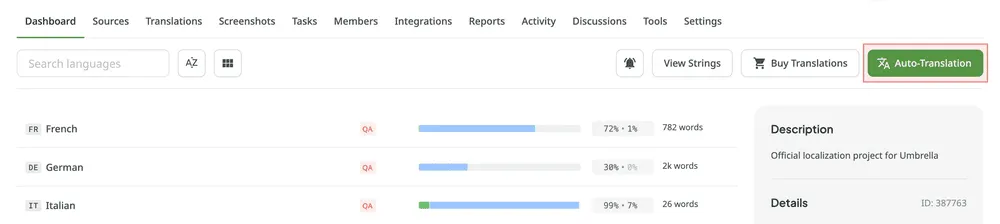
1. Auto-translation (TM, MT, and AI)
Starting translations from a blank page is slow and costly. Modern systems use Auto-translation to populate initial drafts before human linguists take over:
Translation Memory (TM)
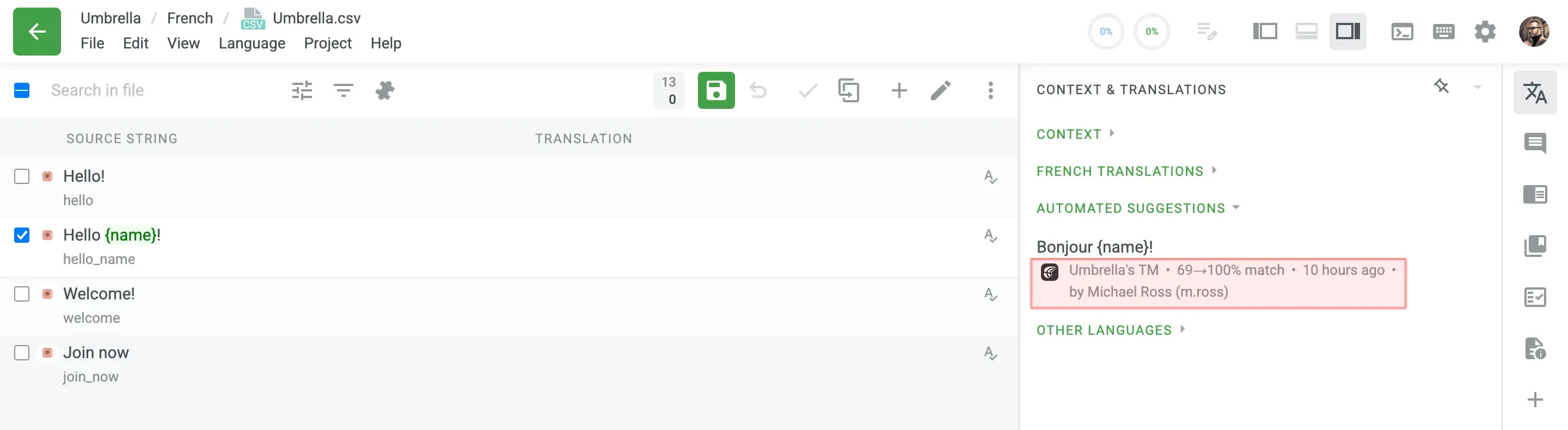
Translation memory is a database that stores every segment (sentence, button, or phrase) you have already translated and approved in the past. When new content is uploaded, the TMS checks it against your TM:
- 100% matches: Exact matches from previous projects are applied automatically, saving both time and money.
- Fuzzy matches: If a sentence is slightly different from a previous version, the system offers the closest match as a draft or suggestion for translators.
Because you never pay to translate the exact same sentence twice, your translation costs decrease over time as your database grows.
Machine Translation (MT)
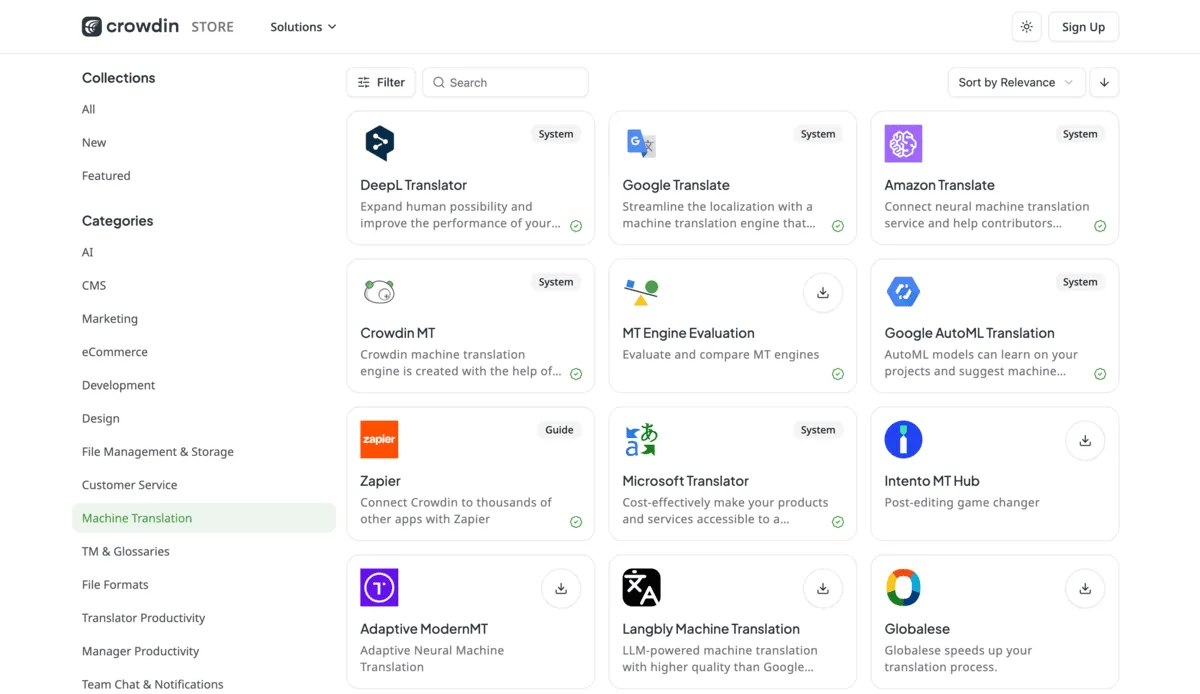
Machine translation provides fast, automated drafts for large volumes of content. Crowdin TMS integrates with the best machine translation software engines like Google Translate, DeepL, Microsoft Translator, and Amazon Translate, as well as Crowdin’s native CrowdinMT.
- Post-editing workflows: Instead of translating from scratch, human linguists simply review and refine MT output (learn more about machine translation post-editing).
- Customization: You can select different MT engines for specific target languages based on engine performance and language pair strength.
See how Bejo Zaden uses machine translation with proofreading by local managers to localize content across 25+ languages.
AI-powered translation
TMS provides a complete ecosystem for integrating Large Language Models (LLMs) (such as OpenAI, Anthropic, Gemini or your own custom fine-tuned models) directly into your software pipelines.
To see how teams structure these deployments from the ground up, check out our comprehensive AI localization guide. Key technical components of Crowdin’s AI architecture include:
- Custom AI Pipelines and multi-step prompts: Instead of a single generic translation pass, you can build automated multi-step sequences. For example, you can route a string through an initial LLM translation prompt, pass it to a secondary prompt to enforce brand tone, and run a final syntax validation. Learn more in our guide on AI Pipelines.
- Crowdin AI Copilot: Provide your localization managers and translators with an intelligent assistant embedded directly in the workspace. Copilot doesn’t just output text – it explains its linguistic choices, adapts dynamically to brand personas, and assists with context resolution. Read how it works in our deep-dive on the Crowdin AI Copilot.
- Context-aware AI translation: AI models ingest your glossaries, style guides, and UI screenshots simultaneously to eliminate context-related errors and translation drift.
2. Style guides and glossaries
Maintaining a unified brand identity across languages requires more than just correct translations.
- A glossary stores your brand’s approved vocabulary and key product terms. It guides both human translators and AI models, guaranteeing consistent brand messaging across every language.
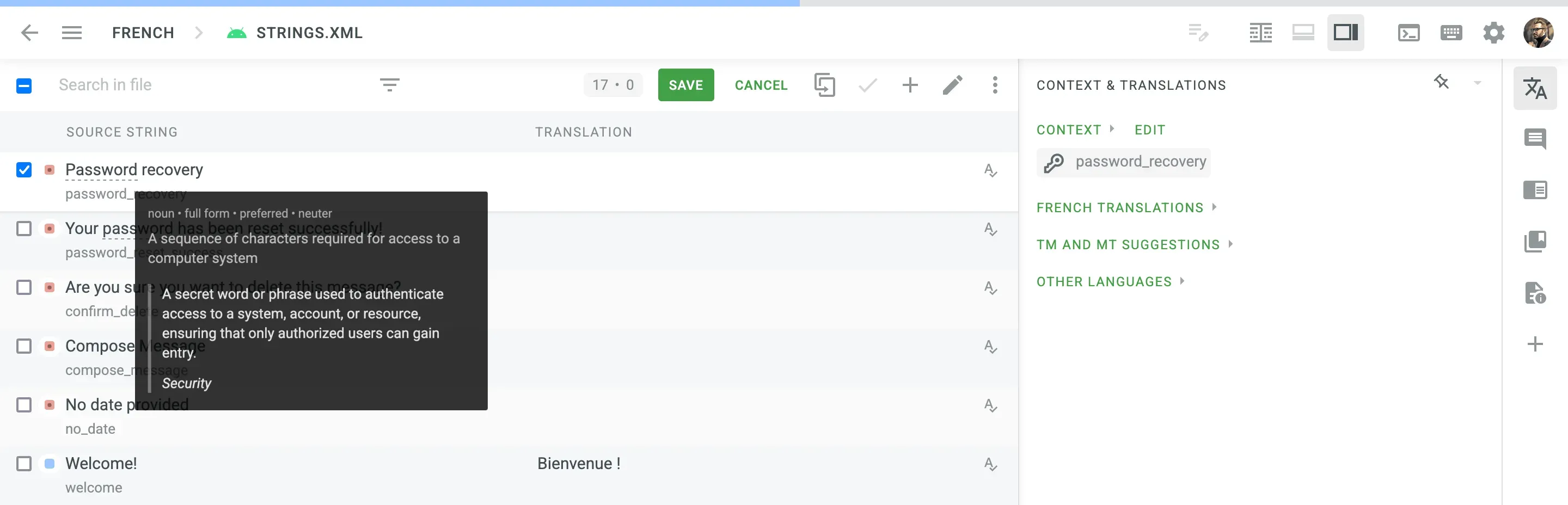
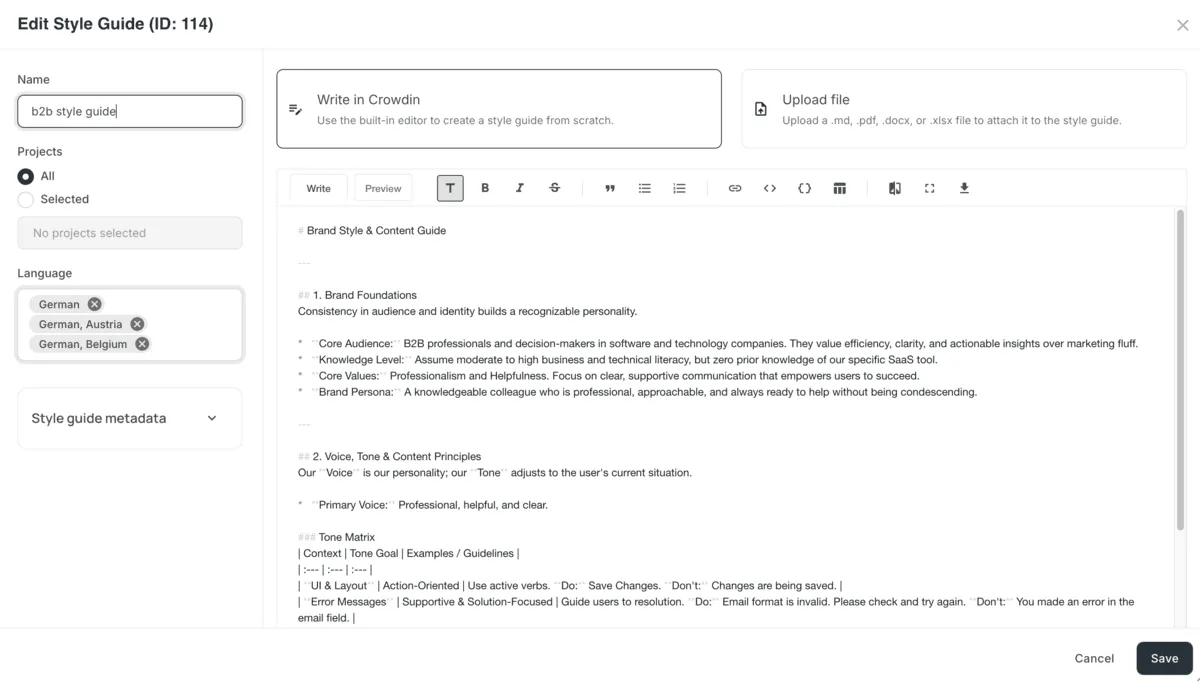
- Define your brand’s voice and formatting rules in a style guide. It guides linguists and AI on choosing the right tone, using preferred punctuation and date formats, and understanding target audience preferences.
3. Human translation, proofreading and vendor management
While automation speeds up the first draft, human expertise is key for nuanced content, creative copy, or important UI text. A TMS gives you one place to manage all your translators and reviewers:
- In-house teams and freelance translators: Assign languages, files, or specific tasks directly to internal team members or external linguists.
- Proofreading: Add review steps where native speakers check for tone, context, and accuracy before content goes live.
- Vendor management: Connect with translation agencies or order language services directly inside Crowdin’s Marketplace – no emailing files back and forth.
You can create a task in Crowdin and hire a trusted translation vendor directly from the platform in just a few clicks.
Community-driven and curated crowdsourcing
If you have an engaged community or a strong consumer brand, your users can be your best translators. With a TMS, crowdsourcing doesn’t mean opening the floodgates to everyone. You can set up strict access rules, apply glossaries and style guides, and restrict editing permissions so only trusted power-users or local professionals refine the text.
Discover how MyHeritage built a structured workflow for 50 languages – combining automated tools with curated community and expert reviews. Read the MyHeritage localization case study.
4. Visual сontext: Screenshots and In-Context editing
Translators and AI models deliver better quality when they can see where the copy actually lives. Instead of guessing the meaning of short strings like “Save”, “Free”, or “Book”, visual context ensures accurate translations on the first try.
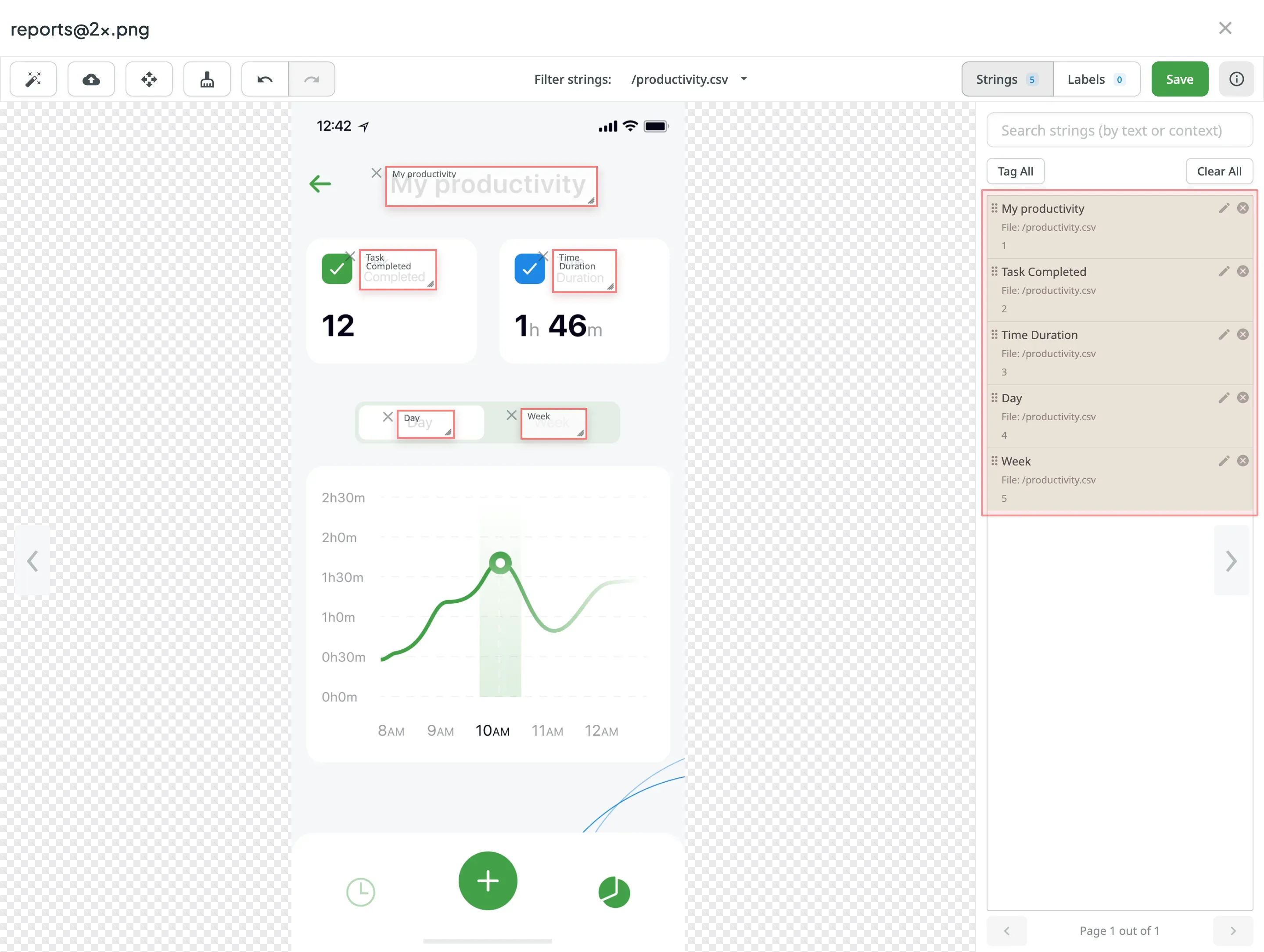
- Screenshots with OCR: Upload UI screenshots directly to your project. Crowdin’s Optical Character Recognition (OCR) automatically scans the images and links the text in the picture to the exact translatable keys in your project.
- In-Context Editor: Allows linguists to translate directly inside a live preview of your web or mobile app. They can type translations and instantly see if the text fits UI boundaries, buttons, or dialog boxes. Crowdin offers a demo where you can experience In-Context editing feature firsthand.
Discover how context can improve translation accuracy.
5. Workflow automation
Manual project management – emailing files, checking progress, notifying translators, and moving completed files around – slows down product releases. Workflow automation puts your content pipeline on autopilot.
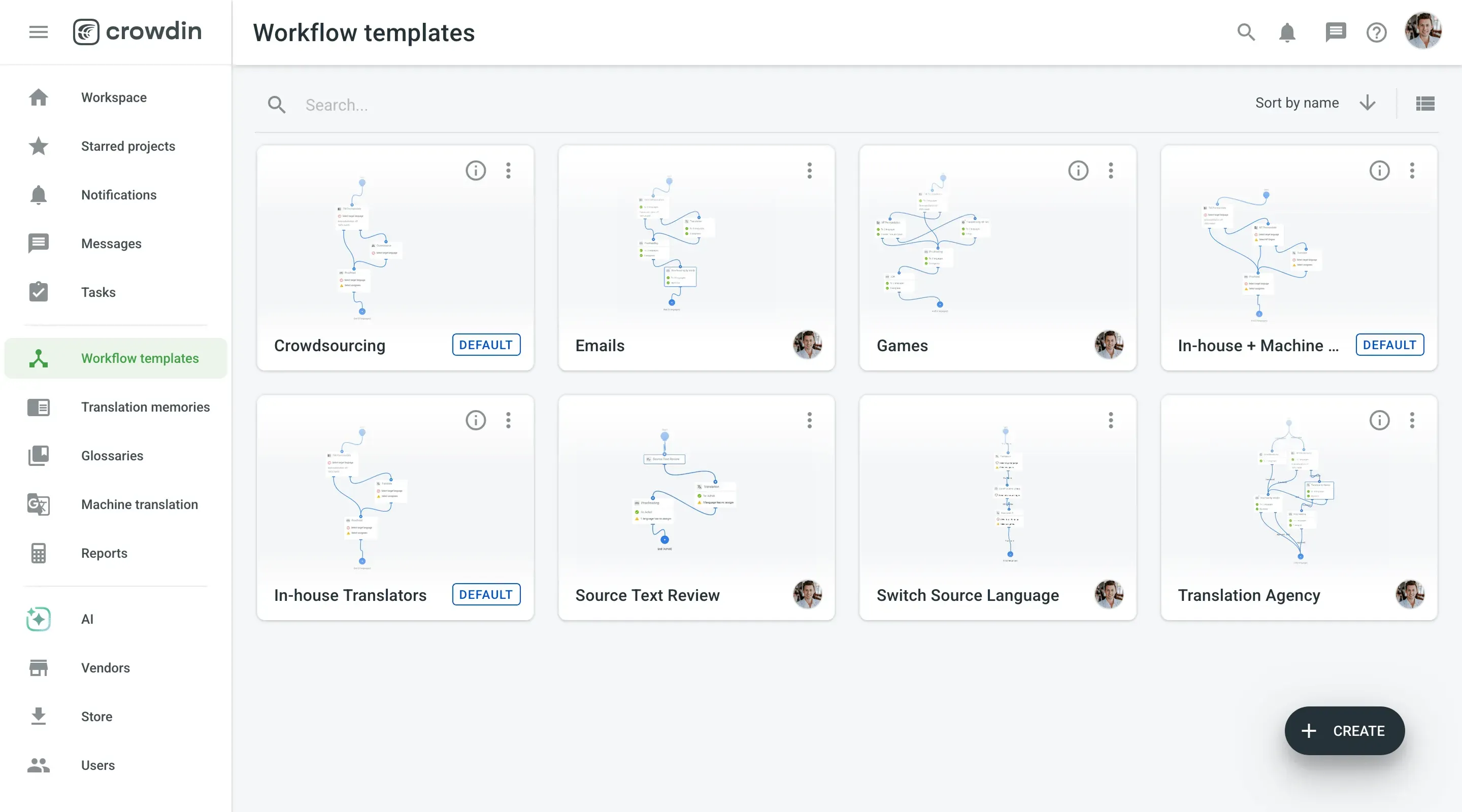
You can build custom, multi-step workflows using a visual builder. The TMS automatically routes content to the right person or AI model at each stage and notifies team members when tasks are ready.
6. Automated QA checks
To prevent embarrassing typos, broken layouts, or syntax errors from reaching production, a TMS runs real-time automated QA checks as content is translated.
The system continuously scans translations to catch issues before they are saved:
- Formatting and placeholders: Missing code tags, broken variables (for example,
{user_name}), or altered HTML/Markdown. - Terminology and rules: Unchanged source strings, capitalization errors, or violations of your official glossary terms.
- UI constraints: Translations that exceed specified character limits and would break the design layout.
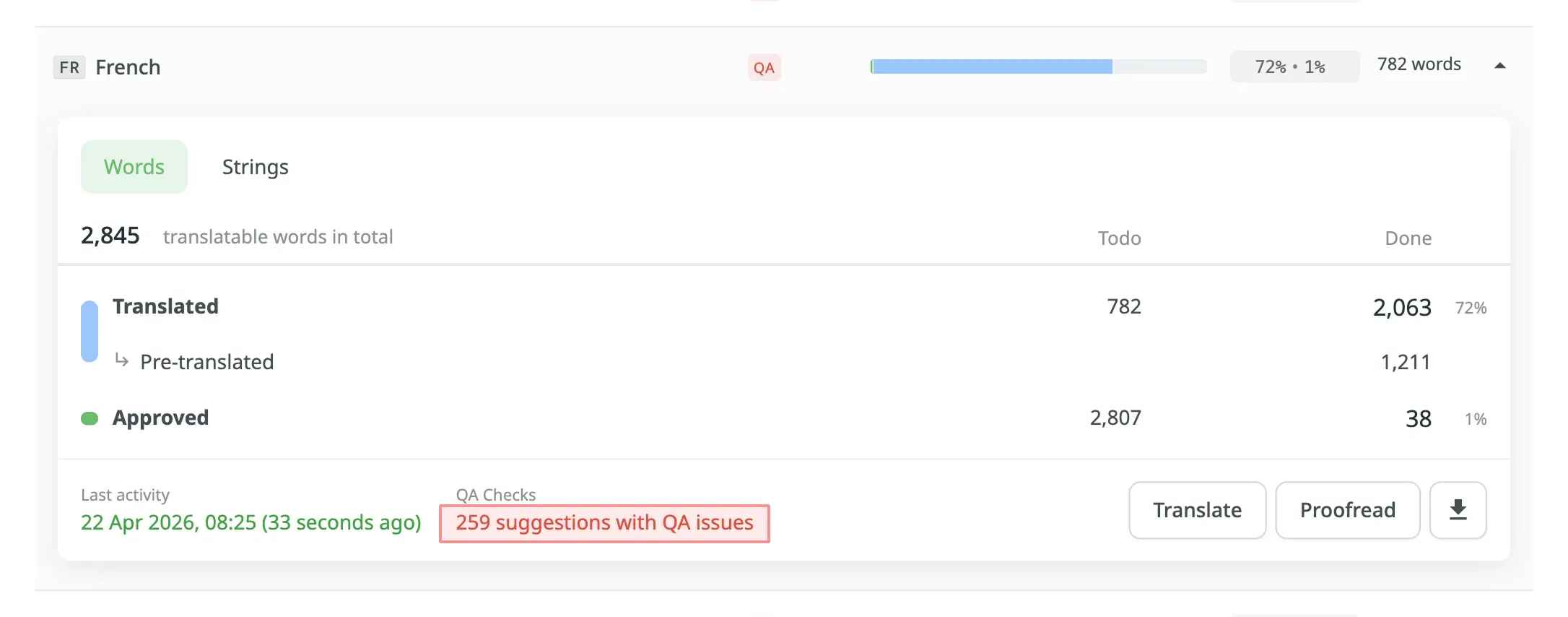
Inside the AI Prompts tab, you can build your custom AI-powered QA check – define rules, choose the model, and run the check at the end of the translation step.
7. Integrations and API ecosystem
A TMS needs to fit directly into your existing software development and content stack.
Look for pre-built connectors across your core tools:
- Development and version control: GitHub, GitLab, Bitbucket, Azure DevOps.
- Design systems: Figma, Adobe XD, Sketch.
- Content and CMS: Contentful, WordPress, Webflow, HubSpot, Adobe Experience Manager.
- Support and communication: Intercom, Zendesk, Slack, Jira.


With 700+ apps and integrations, webhooks, a REST API, and a CLI, platforms like Crowdin allow source content and completed translations to sync continuously without manual engineer intervention.
Can’t find an integration with your specific favorite tool? You can always ask the Crowdin team to build it!
Check how your tool stack integrates with Crowdin
How to choose the best translation management system
Finding the right TMS isn’t about choosing the most complex platform on the market. It should be about matching a system to your team’s existing workflows, technical stack, and long-term growth plans.
When evaluating options, focus on these core criteria to ensure the platform delivers immediate value and scales with your business.
Will it scale as you grow?
Your translation requirements will change as you enter new markets and scale your product. A modern TMS must support expanding content volumes, an increasing number of target languages, and growing internal or external teams without performance bottlenecks or unexpected operational hurdles.
Crowdin handles everything from small startups to large enterprises. You can easily add projects, languages, and team members as you grow. This ensures smooth scaling without costly architectural changes.
Can your team adapt to it quickly?
A powerful platform is useless if your developers, marketers, or translators find it difficult to use. An intuitive interface ensures fast adoption across teams with minimal training, reducing the friction usually associated with deploying new software. A great TMS has a user-friendly interface with clear dashboards, navigation, and customized workflows that just make sense.
Crowdin is actually known for its intuitive UI/UX. Non-technical users can navigate dashboards and manage content easily, while linguists work in an editor optimized for speed and clarity.
Does it connect to your tech stack?
Localization content lives across multiple repositories, CMS platforms, design software, and support desks. The best TMS acts as a central hub, connecting to your tech stack via robust APIs, webhooks, and pre-built integrations to eliminate manual file exports and copy-pasting.
As we mentioned earlier, Crowdin Store has over 700 pre-built apps and integrations with platforms such as GitHub, Figma, HubSpot, and many more.
Can you count on fast technical support?
Even with the most intuitive software, questions and unexpected errors are likely to arise. When they do, reliable customer support, documentation, and an active user community are invaluable. A good TMS provider offers many ways to get help. Chat, email, and phone support, plus knowledge bases, tutorials, and user forums.
Crowdin offers documentation, video tutorials, a community forum, and 24/7 support, so you are never left wondering what to do next.
How safe is your source code and AI data?
Protecting proprietary source code, customer information, and brand assets is critical. Ensure your TMS vendor adheres to strict international security standards and enforces proper data protection policies – especially when using integrated AI models.
Crowdin translation management system complies with GDPR and HIPAA, and holds ISO 27001 certification. We use secure Amazon Web Services (AWS) data centers with geographical restrictions, ensuring your data stays where it needs to be.
What’s more, we use mandatory hardware 2FA and only permit access from company-managed devices. It adds serious layers of protection, making sure only authorized people can get to your valuable content. Private data processed through AI integrations is encrypted and never used to train public LLM models.
What about pricing and real value?
Finally, let’s talk about the bottom line: pricing and value. You need to clearly understand how you will be charged – is it per word, per user, based on subscription tiers? (Recommend you to check our comparison between hosted vs processed words pricing model). And perhaps more importantly, do the features and benefits justify the cost for your specific volume and needs? Look for a TMS with flexible pricing models. These should offer good value, no matter your business size or how much you translate.
For instance, Crowdin provides flexible pricing plans. They fit various business sizes and needs, from small teams to large companies. You get real value for your investment, based on how you actually use it.
Here’s how a platform like Crowdin compares against the above points:
| Feature/Criteria | General TMS Solution | Crowdin’s Solution |
|---|---|---|
| Scalability | Handles growing content, languages, and users without performance loss. | Designed to scale from early-stage startups to enterprise projects. |
| Ease of Use | Intuitive navigation and clear dashboards for fast onboarding. | Clean UI/UX for adoption with minimal training required. |
| Integrations | Connects to dev tools, CMS, and design platforms via APIs/connectors. | 700+ apps and integrations, native CLI, REST API, and custom app framework. |
| Reliable Support | Crucial for when issues arise; provides help via various support channels, knowledge bases, and user forums. | Comprehensive support: docs, tutorials, community forum, responsive 24/7 support. |
| Data Security | Industry compliance (ISO, GDPR), encryption, and strict access controls. | ISO 27001, GDPR, HIPAA compliant. AWS geo-fencing, hardware 2FA, and strict AI data privacy. |
| Pricing Model/Value | Flexible tiers matching business size, usage, and project scope. | Predictable, usage-based plans tailored for both small teams and enterprise needs. |
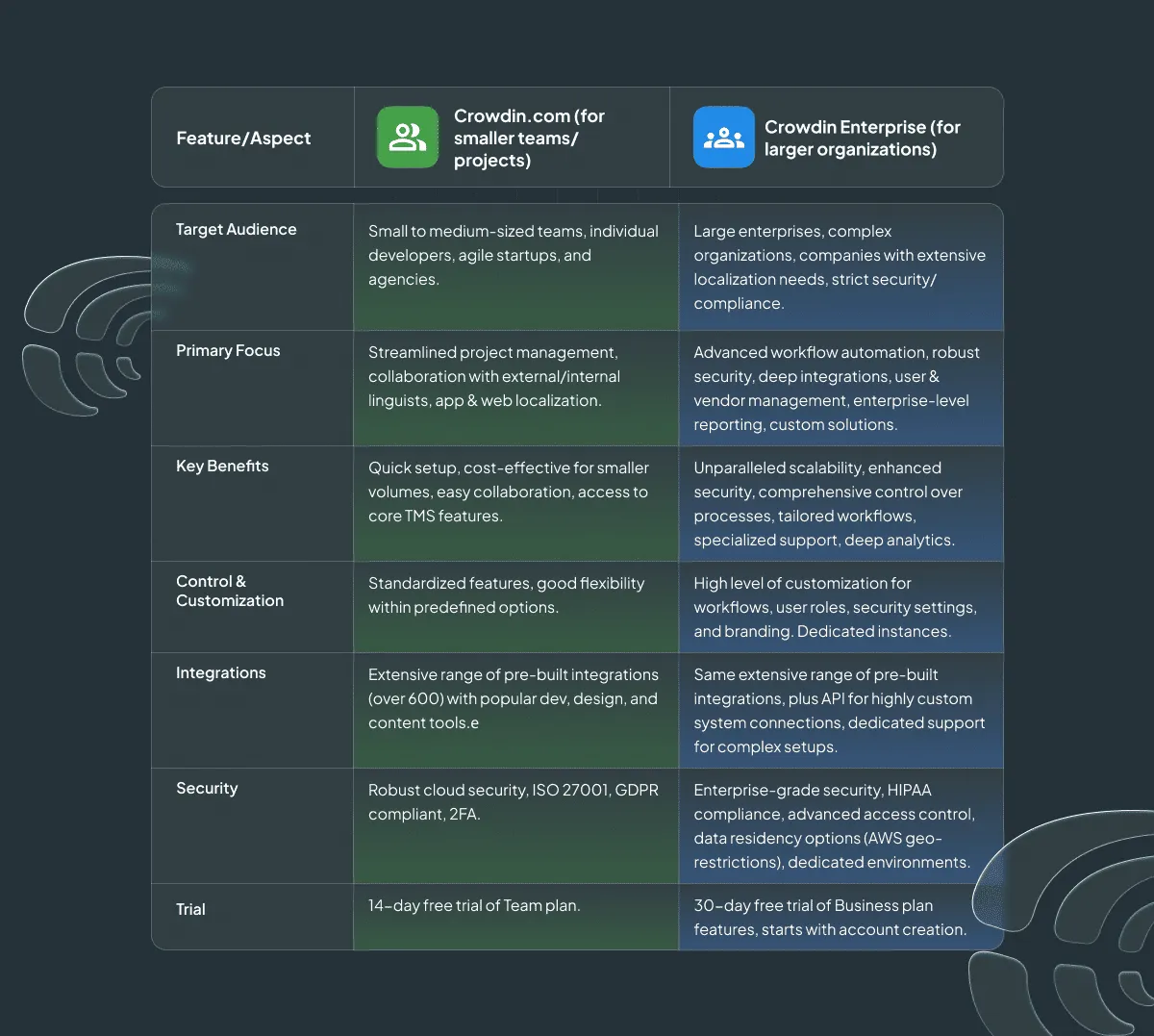
What is the best way to know if a TMS fits your budget and workflow? Try a free trial. To try Crowdin’s Team plan, just register and create your first project. You’ll get a 14-day free trial. Big companies can try Crowdin Enterprise for 30 days, free. This trial starts when you sign up and unlocks all Business plan features.
Start your 14-day free trial now
Translation management system for teams of any size
A common misconception is that a TMS is built only for multinational enterprises with massive localization departments. In reality, modern localization platforms deliver immediate value to organizations of any scale.
If you publish or update translated content regularly (whether it’s software UI, marketing assets, documentation, or app copy) a TMS can bring structure to your releases.
- For growing startups and SMBs: Lean teams rarely have dedicated localization managers or endless engineering cycles. A TMS automates file transfers, centralizes terminology, and allows small product teams to launch in multiple languages without hiring extra project management headcount.
- For medium-sized companies and enterprises: Large organizations with complex permissions, multiple product lines, and vendor networks require security, audit trails, and strict compliance. Enterprise features ensure granular access controls, custom AI pipelines, and seamless synchronization across hundreds of repositories and CMS instances.
Crowdin scales with your business, providing lightweight, plug-and-play workflows for growing products and enterprise-grade infrastructure for global brands.
Ready to automate your localization pipeline?
Whether you’re a fast-scaling startup entering your first international markets or an enterprise managing complex, multi-repo software ecosystems, a TMS is the right solution for you.
Platforms like Crowdin combine developer-first automation, custom AI pipelines, and enterprise-grade security. Replace manual file transfers and fragmented translation passes with a centralized hub, and speed up feature releases, maintain global brand consistency, and eliminate manual work for your team.
Translate smarter with Crowdin TMS
FAQ
What exactly is a Translation Management System (TMS)?
A Translation Management System (TMS) is cloud-based software that centralizes and automates the entire localization lifecycle. It connects content repositories, design files, and codebase environments with human linguists and AI engines – eliminating manual file transfers and automating translation updates from creation to release.
What role does a TMS play in the localization process?
A TMS serves as the central control hub for all translation activities. Unlike standalone tools (like traditional CAT tools or machine translation engines), a TMS combines Translation Memory, Glossaries, visual context, automated QA checks, and vendor management into a single continuous pipeline. This allows developers, product managers, and linguists to collaborate in real time without blocking product releases.
What business benefits does a TMS provide?
A TMS replaces manual, spreadsheet-based localization with an automated workflow. Key benefits include:
- Faster Time-to-Market: Automated continuous localization lets you release localized product features, app copy, and marketing content simultaneously across all target markets.
- Cost Savings: Leveraging Translation Memory, AI pre-translation, and automated QA reduces per-word costs and prevents repetitive translation tasks.
- Consistency and Quality: Enforcing centralized glossaries, style guides, and in-context previews ensures brand accuracy across all languages.
- Engineering Savings: Developers set up integrations, CLI, or webhooks once, allowing marketing and product teams to update content without developer intervention.

Yana Feshchuk
Yana Feshchuk is a Partnerships Marketing Manager. Her expertise lies in developing authoritative and well-researched content for the localization field.