

For years, the promise of AI in localization has been shadowed by a frustrating reality: unpredictability. A single monolithic instruction ignores carefully curated glossaries, hallucinates technical tags, or quietly loses a brand’s established voice – and you only find out downstream, string by string.
That unpredictability is what makes AI translation expensive. Not the tokens – the review. When you can’t tell which strings the model got right, someone has to check all of them, and the savings disappear into your reviewers’ calendars.
AI Pipelines are our answer to that – modular, multi-stage workflows that give an LLM one job at a time and check its work before you ever see it. What you get back is output your team can trust without reading every line of it. Since launch, they have grown into three ways of working: a two-question setup that covers most teams, ready-made templates for common content types, and a fully custom builder for everything else. This guide walks through all three.
Sinch publishes 56% of AI translations without human review. See the pipelines behind it.
Why modular logic beats single prompts
Relying on one massive instruction is a high-risk strategy. Overwhelm a model with context, glossary, tone of voice, and formatting rules at once, and it drifts: it starts inventing text, dropping placeholders, and quietly ignoring the rules further down the list. Even a linguistically correct translation can fail technically by breaking critical placeholders or ignoring formal registers.
A pipeline attacks this from two directions. It removes the guesswork before translation by gathering real context and setting aside the strings that can’t be translated safely, and it verifies after translation with independent steps that each have exactly one job. A model is far less likely to invent anything when its only task is to compare two things and report the difference.
AI Pipeline breaks the process into seven specialized steps. Every pipeline you build – whichever of the three routes you take – is assembled from the same set:
Before translation – eliminating the guess
- Screenshot Context – lets AI read the screenshots your strings are tagged on and describe where each string appears, so a lone “Open” is translated as the button it actually is instead of a plausible guess. Descriptions are cached for 30 days.
- AI-Generated File Context – reads the file as a whole, so long-form content isn’t translated string by string in a vacuum. Scoped to file patterns, so it only runs where it matters.
- Ambiguity Filter – identifies strings with several possible meanings and sets them aside instead of forcing a 50/50 statistical guess.
Translation
- Translate – the only step that generates translations. Everything after it produces corrections, not rewrites.
After translation – catching what drifted
- Artifact Correction and Prompt Adherence – sends an additional request to AI to check translations against your Translate instructions and fix any that drifted. It reuses what you wrote there, so you never repeat the rules.
- File Consistency Check – compares new translations against what’s already in the file, so an update doesn’t read like an update.
- QA Checks – catches broken tags, placeholder mismatches, and formatting damage before anything reaches a human.
The order carries as much weight as the steps themselves. Context is gathered before the model commits to anything, and every check runs afterwards, each one seeing the output of the last.
Choose your AI Pipeline preset
The Simple tab is what opens by default, and for most projects it’s the only one you’ll need. It asks two questions, and your answers assemble the pipeline – you see the result before you save anything.
How thorough should the quality checks be?
Three quality levels, built from the same steps. More thorough means more steps run, and a higher cost per string.
| Level | Resulting pipeline | Best for |
|---|---|---|
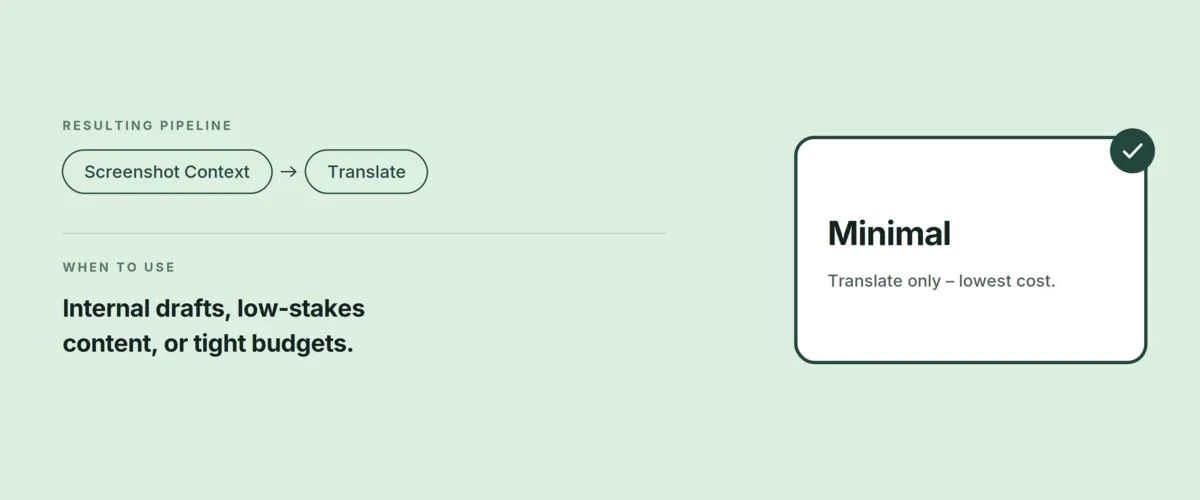
| Minimal | Screenshot Context → Translate | Internal drafts, low-stakes content, or tight budgets |
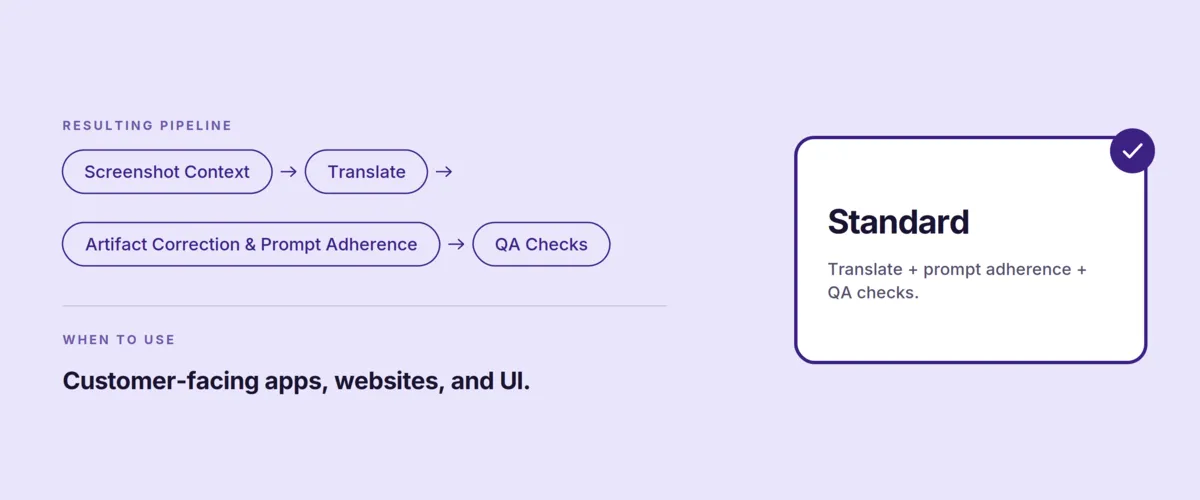
| Standard | Screenshot Context → Translate → Artifact Correction & Prompt Adherence → QA Checks | Customer-facing apps, websites, and UI |
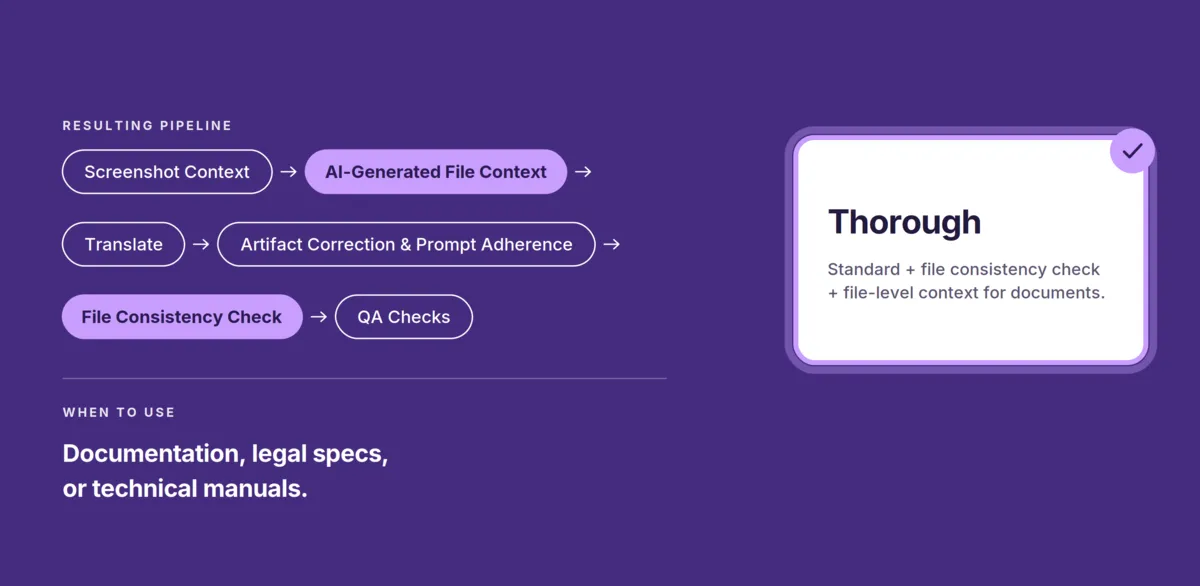
| Thorough | Screenshot Context → AI-Generated File Context → Translate → Artifact Correction & Prompt Adherence → File Consistency Check → QA Checks | Documentation, legal specs, or technical manuals |
What to do with strings that are hard to translate?
This is a separate decision, not part of the level. Attempt to translate sends everything through regardless of ambiguity. Filter out inserts the Ambiguity Filter before the Translate step, at whichever level you picked, and skips strings that lack the context to be translated safely.
Whichever you choose, the Resulting pipeline preview below updates immediately, with inactive steps greyed out. You can see exactly what will run before a single string is processed.
1. Minimal
The cheapest way to run a pipeline is not the same as raw AI translation. Even at this level, Screenshot Context stays on: the AI reads the screenshots your strings are tagged on and describes where each one appears, so the word “Follow” is understood as a button that subscribes to a profile rather than an instruction to carry out.
Then it translates. Two steps, no checks, lowest cost per string.
This level assumes your content can absorb an error – internal tooling, drafts, anything short-lived. And it has one hard dependency: if your strings aren’t tagged on screenshots, Minimal really is translation alone. Tag them, or move up a level.
2. Standard
For customer-facing UI, the real challenge is adherence. Most AI errors happen because the model simply forgets the rules mid-translation.
Standard adds two steps after translation. Artifact Correction & Prompt Adherence sends an additional request to AI, checking the translations against the instructions your Translate step used and fixing any that drifted. It reuses what you already wrote there, so your glossary terms and brand rules live in exactly one place. QA Checks then catches what a linguistic review misses: broken tags, mismatched placeholders, damaged formatting.
The best part is that the AI corrects itself. There is nothing to resolve manually – you see the already edited output, ready for use.
3. Thorough
Thorough is built for long-form content, where consistency across a whole document matters more than the cost of any single string. It wraps two more steps around what Standard already runs.
AI-Generated File Context runs before translation, reading the file as a whole so the AI isn’t working string by string in a vacuum. File Consistency Check runs after, comparing new translations against what is already in the file, so an update doesn’t read like an update.
Both are scoped to file patterns, so they only touch the content that needs them:
- When to use it: narrative or technical flow – documentation, help articles, or legal specs.
- When to skip it: simple resource files, like a list of unrelated app buttons, where nothing depends on anything else.
By reading the other 90% of a file, this level ensures the new 10% maintains a unified voice throughout.
Ambiguity Filter
The primary risk in translation happens when an AI model is forced to make a statistical guess. When an LLM hits a word with several possible meanings and no clear environmental clues, it won’t stop to ask for clarification. Instead, it gambles on a translation that might lead to an incorrect translation that ruins the experience for your users.
To solve this, you can add an Ambiguity Filter (or “Filter out” step) to any pipeline. This filtering process is performed before translation begins. Instead of letting the AI guess, this step identifies high-risk strings and flags them for review.
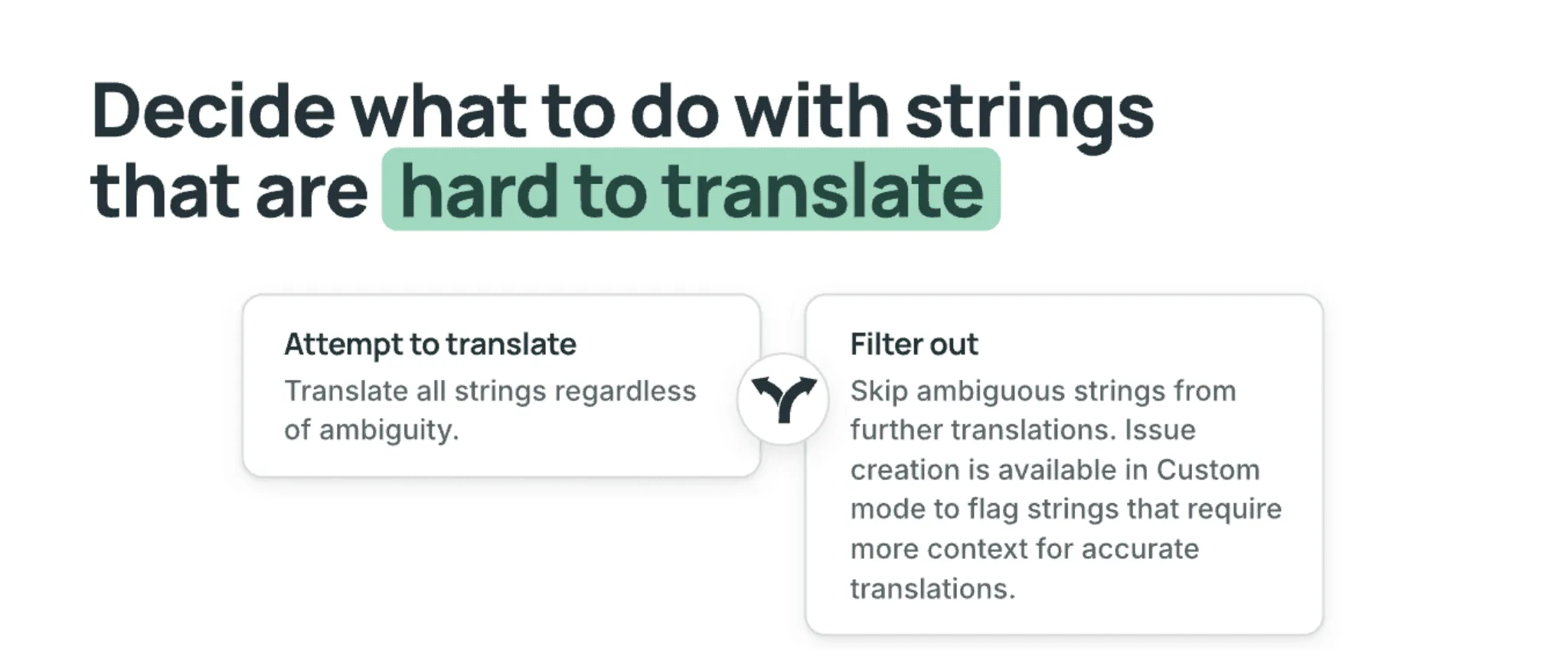
How the ambiguity filter works
This filter analyzes your strings based on strict logic to ensure only safe content moves forward:
- It uses project metadata, glossary terms, and even neighboring strings in the same file to resolve meaning.
- If a target language requires missing information (like speaker gender for Japanese or formal/informal choices for German and Spanish) the string is filtered out.
- The system follows a “when in doubt, filter out” rule. It is designed to prioritize human review over a “probably correct” AI guess.
Filtering doesn’t have to mean a mountain of manual labor if you use the AI Pipeline alongside Crowdin Copilot.
In Custom mode, the step can go further and create issues for the strings it sets aside, so what gets flagged turns into actual work in your project rather than a list someone has to remember to check.
Custom AI Pipelines
Presets cover the vast majority of needs, but enterprise workflows aren’t always standard. Switch to the Custom tab and you get the same seven steps on an open canvas, where the order, the scope, and the wording of every step are yours.
Steps aren’t added and removed here – they are all on the canvas from the start, each with a toggle. Switch one on and it joins the pipeline and picks up a number; switch it off and it stays visible but greyed out, so you can see what you chose not to run. Drag a step by its handle to change where it sits in the sequence.
The real depth is in the panel that opens when you select a step:
- Rewrite the instructions for any step. Each one ships with a default you can edit freely, using placeholders like
{{input.project.name}}or{{input.targetLanguage}}to pull in project data. A Reset to default link undoes your changes whenever you need it. - Rename a step. The name shows on the block and in the logs, which matters once a pipeline has two review steps doing different jobs.
- Scope a step to file patterns. Apply a step only to files matching
**/*.mdordocs/**/*.txt, so the logic hits only the intended content. - Set a model and a reasoning effort per step, each inheriting from the pipeline’s global setting unless you override it.
One detail worth knowing: Artifact Correction & Prompt Adherence checks your translations against the same instructions that produced them. You don’t restate your glossary rules or tone of voice for the review step – it reads what the translation was generated from and checks the output against exactly that. Your rules live in one place, and the two steps can’t drift apart.
Start from a template instead of an empty canvas
You don’t have to configure all seven steps yourself. Templates menu at the top of the Custom tab loads a working pipeline built around a specific kind of content, which you then adjust:
| Template | What it does | Best for |
|---|---|---|
| Basic | A single translation step and nothing else | Starting out, or testing a model before you build around it |
| UI Localization | Reads your screenshots first, then checks afterwards that each translation fits the screen it appears on | App and product interfaces – only worth it if your strings are tagged on screenshots |
| Docs Translation | Checks every batch against what’s already translated in the file, so a long document reads as one piece | Documentation, help centers, knowledge bases |
| Per-language Rules | Adds a per-language review on top of the shared flow, with German and French orthography as an example to adapt | A single target language that keeps producing the same category of error |
Selecting a template replaces the current pipeline, so pick one before you start adjusting steps rather than after. Everything above still applies once it’s loaded – every step is yours to rename, rewrite, scope, or switch off.
Describe the pipeline, and Copilot builds it
Custom tab assumes you already know which steps you need. If you don’t, you are guessing – and the way to find out is to run a few pipelines and see what each step catches.
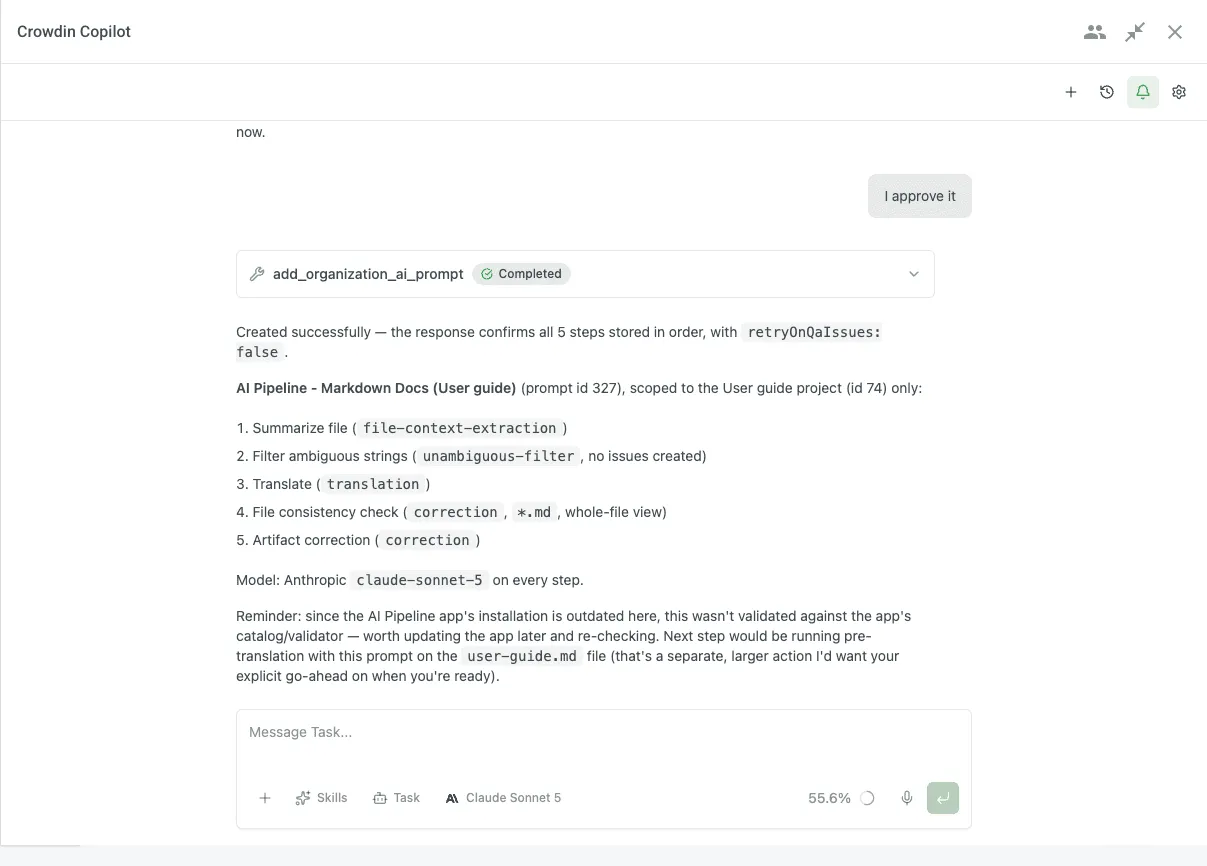
Crowdin Copilot can help you with that. Describe what you need in plain language and it builds the pipeline with you.
What makes this more than a shortcut is that Copilot reads your project first – your languages, the file types you actually have, whether your screenshots are tagged – and only offers steps your project can support. Ask for screenshot-based context on a project with no tagged screenshots and it won’t quietly add a step that has nothing to read. Then it asks a few short questions about the decisions that genuinely depend on your judgment: ambiguity filtering, QA checks, language-specific rules.
Nothing is created until you approve it. You get the whole pipeline as a plan – every step with its scope and its model – and Copilot validates the configuration before saving, so a broken pipeline doesn’t surface halfway through a run on real content. It works on pipelines you already have, too: add a step, drop one, reorder them, or point Copilot at an existing pipeline that already does what you just described.
Fixing what the filter set aside
Filtering out ambiguous strings only helps if resolving them is faster than translating them by hand. That’s the other half of the job, and Copilot handles it in bulk.
Instead of working through flagged strings one at a time, Copilot groups similar ambiguities together. If the word Balance is flagged in 50 places, you explain the context once and the fix applies across the whole set. A short hint to the agent covers grammatical issues spanning every related string, rather than 50 separate decisions that are really one decision repeated.
Skills you don’t have to install
Two of Copilot’s built-in skills are about pipelines specifically. AI Pipeline Prompt Design is what’s behind building and editing multi-step instructions. AI Pipeline Pre-translation runs the pipeline as auto-translation and enriches string context along the way.
Both are listed in the Crowdin Store so you can see what they cover before you ask, but there is nothing to install – they’re already in Copilot.
From AI translation to localization project management.
How it looks in practice
We tested this pipeline on a file with 42 strings. Instead of letting the AI guess and potentially make mistakes in translations, the Ambiguity Filter passed first.
AI translated 22 strings it was sure about and skipped the other 20 that were too vague. This is the big win: rather than a human proofreader having to check all 42 strings for hallucinations, they only had to look at the 20 specific ones the AI flagged. It basically creates a targeted to-do list for your team.
Check out the full workflow in the video here:
Eliminating language contamination
The power of the AI Pipeline is best illustrated by Dr. Nadja Ruhl, LangOps Architect at Chainels. When translating Nordic languages with AI, a recurring challenge is “Swedish contamination” – where the AI accidentally slips Swedish words into Norwegian Bokmål.
To solve this, Dr. Ruhl utilized a custom AI Pipeline to edit the Translation step prompt directly. By adding a specific “Language-Specific Rules” section, she provided the AI with an explicit list of Norwegian equivalents for common Swedish “false friends” (like using være instead of vara). This granular control allows teams to document real errors found during QA and bake the fixes into the workflow, ensuring the AI maintains linguistic purity across related-language pairs.
What Dr. Ruhl assembled by hand is now a starting point: the Per-language Rules template ships with exactly this shape – one shared flow, plus a review step that fires for a single language – with German and French orthography as the example to adapt.
Running pipelines at 5M words a quarter
Chainels shows what one well-aimed rule can fix. Sinch shows what happens when the same approach runs an entire localization operation.
Working with Undertow as their embedded language team, Sinch built separate flows for each content type – automated AI translation for their help centers, multi-step instructions for marketing where keyword research feeds into the translation before the first draft, and stricter pipelines with targeted human evaluation for UI strings. In Q1 2026 alone they processed roughly 5 million words, more than their entire 2025 volume, while holding 85–95% expected quality across every automated pipeline.
AI now produces 65% of their total translation volume, with human proofreading and LQA focused strictly on high-stakes, customer-facing assets. Every error their linguists catch during LQA feeds back into the glossaries, style guides, and step instructions, so the pipeline stops repeating it – and the whole setup delivers roughly 20x their previous output on the same budget. The full case study walks through all three pipelines.
Feed the fixes back into your pipeline
That loop is worth copying at any scale. When the pipeline gets something wrong twice, fix it in your glossary or style guide, not in the step’s instructions. A term your reviewers keep correcting belongs in the glossary. A tone they keep rewriting belongs in the style guide. Both feed every future run, in every pipeline you have.
Don’t want to track that by hand? Crowdin Dreams watches how your linguists edit AI suggestions and turns the patterns into glossary terms and style guide rules for you.
Your AI translation pipeline got better. What about everything you already translated?
This is the part nobody plans for. You spend a month tuning a pipeline – better context, a review step that catches what your linguists kept flagging, a language rule that finally stops one recurring error – and it works. On everything from now on.
Behind it sits every string translated by the earlier version: the one without the context step, before you rewrote the Translate instructions, back when a cheaper model handled the whole thing. Nobody is going to reread those. And “we’ll fix them as we go” means living with two quality standards in the same product indefinitely.
Re-Translation is a two-click workflow for exactly this. Point it at content translated by an older setup and run it through your current pipeline – the improvements apply backwards, not just forwards.
It’s worth doing whenever the pipeline changes in a way that would have produced a different result: a new step, rewritten instructions, a better model on Translate, a glossary or style guide that didn’t exist when the content first went through. Scope it the way you’d scope anything else – your highest-traffic documentation is a better first candidate than a folder nobody opens.
Your choice: quality vs. rework time
It is important to be realistic: high-quality translation is rarely immediate. Every step you add is a separate request to the model, so a deeper pipeline takes longer and consumes more tokens than a single pass.
However, the real expense in modern localization isn’t the cost of tokens, but the time wasted fixing errors. Organizations now face a strategic trade-off:
- Fast AI, slow human review: Rapid results work for low-stakes content but often require extensive manual proofreading to repair broken tags, glossary mismatches, or gender context errors.
- Thorough AI, immediate use: A slightly slower pipeline delivers polished results that are ready for production the first time.
By investing a few extra minutes during the AI phase, you can reduce the manual cleanup needed afterward.
Ready to build your first AI Pipeline?
FAQ
What is an AI Localization Pipeline?
AI Pipeline is a Crowdin app that allows you to build multi-step translation workflows. Unlike a standard AI pre-translation, a pipeline breaks the process into modular steps – screenshot context, file context, ambiguity filtering, translation, adherence correction, file consistency, and QA checks – and lets you choose which ones run.
Can AI hallucinations be fixed?
Not eliminated, but they can be caught before they reach your users – and that’s the practical goal.
A hallucination in translation isn’t random noise. It happens when a model is asked to produce an answer it doesn’t have enough information to produce, and it fills the gap with something plausible instead of stopping. So there are two ways to reduce it: give the model the information it’s missing, or don’t ask it in the first place.
An AI Pipeline does both. Context steps supply what the source text alone doesn’t carry – where a string appears on screen, what the rest of the file says. The Ambiguity Filter sets aside the strings that can’t be resolved even with that context, so the model is never forced to guess on them.
What gets through is then checked by steps that didn’t produce it. A model reviewing a translation against the instructions that generated it has a narrow, verifiable job, which is much harder to hallucinate through than open-ended translation. The output you see has already been corrected once.
How do I prevent AI hallucinations in localization?
The key to preventing hallucinations is moving away from a single, long instruction. When you overwhelm an LLM with too many rules at once (context, glossary, tone of voice, and formatting), it often “drifts” and starts inventing text.
AI Pipeline prevents hallucinations by sequencing separate steps and filtering ambiguity:
- Before translation even begins, the pipeline can run an Ambiguity Filter to identify high-risk strings. If a word has multiple meanings and lacks clear context, the AI flags and filters it out rather than making a statistical guess.
- Instead of one big task, the app breaks the process into a chain of micro-tasks. One step gathers context, another translates, and the next verifies the output independently.
- The Artifact Correction & Prompt Adherence step sends an additional request to AI to check translations against the instructions the Translate step used, and fixes any that drifted. It reuses what you already wrote, so the rules live in one place.
- By isolating tasks, the AI stays grounded. It is much harder for the model to hallucinate when its only job in a specific step is to find and fix discrepancies.
Which AI Pipeline preset should I choose?
Open the Simple tab and pick a quality level:
- Minimal: Screenshot Context and Translate only – best for high-volume, low-visibility content or tight budgets.
- Standard: adds Artifact Correction & Prompt Adherence and QA Checks after translation – the best choice for most UI and marketing projects.
- Thorough: adds AI-Generated File Context before translation and a File Consistency Check after it, so a long document reads as one piece – choose this for documentation, help articles, or legal specs.
Handling of hard-to-translate strings is a separate choice: Attempt to translate sends everything through, while Filter out inserts an Ambiguity Filter before the Translate step at any level.
Does an AI Pipeline take longer than a single-prompt pre-translation?
Yes, it does – but for a good reason. While a single-step AI translation is nearly instantaneous, it often misses nuances or breaks formatting. An AI Pipeline takes more time because it performs multiple passes over the text, and each pass is a separate request to the model.
However, the total time to market is actually shorter:
- The output is much closer to human-grade translation.
- Because the AI performs its own QA and editing, your human linguists spend less time fixing errors.
- You spend slightly more on AI tokens upfront to save a massive amount on manual post-editing (MTPE) costs later.

Yuliia Makarenko
Yuliia Makarenko is a marketing specialist with over a decade of experience, and she’s all about creating content that readers will love. She’s a pro at using her skills in SEO, research, and data analysis to write useful content. When she’s not diving into content creation, you can find her reading a good thriller, practicing some yoga, or simply enjoying playtime with her little one.